
LinkedIn Patches #108 Answer & Analysis
Stuck on LinkedIn Patches #108? Get spoiler-friendly Patches hints, the final grid solution, and a clear step-by-step explanation for today’s LinkedIn Patches puzzle.
This page includes the final answer and full analysis for LinkedIn Patches #108. Use the hints first if you want to solve the puzzle before revealing the answer.
LinkedIn Patches #108 Hints
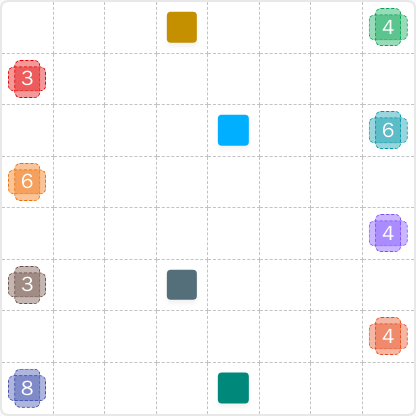
For LinkedIn Patches #108 on 2026-07-03, begin with the patches that have the least freedom: the corner and edge regions. The fastest progress usually comes from locking the cells that cannot expand in more than one direction.
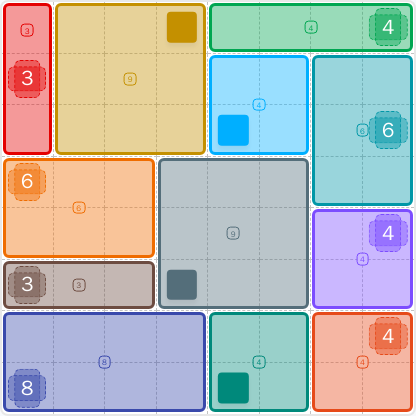
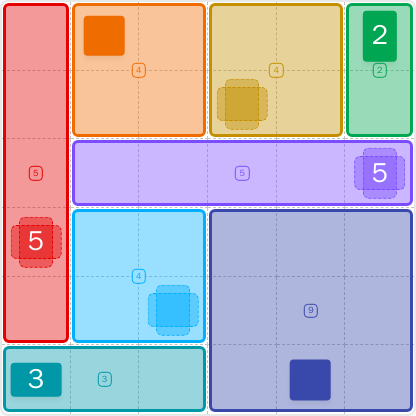
The 9-cell patch and the 8-cell patch need the biggest uninterrupted spaces, so they are excellent anchors for today's LinkedIn Patches puzzle. Once those are placed, the smaller regions become much easier to position.
The upper row and upper-left block are heavily constrained. Look for a clean 3x3 area for the 9-cell region and a short, forced strip for the patch on the far left.
On the right edge, one patch is forced to stretch downward while another fits into a compact 2x2 pocket below the top band. This interaction is one of the key LinkedIn Patches #108 hints.
The center of the board becomes a natural divider once the larger edge patches are fixed. That central region helps separate the middle-left and middle-right patches without leaving isolated cells behind.
The last few patches are forced by the remaining space along the bottom. If your earlier placements are correct, the bottom-left block and the two 4-cell squares on the bottom row will fit perfectly without gaps.
Still Stuck? Click on Reveal Patches #108 Answer below.
LinkedIn Patches #108 Answer
Original Puzzle
Final Answer
How to Solve LinkedIn Patches #108
Previous Patches Answers
Play Unlimited Patches Games
Enjoy unlimited Patches and other puzzle games anytime. No daily limits, just endless fun!
Play Now - Unlimited GamesMore LinkedIn Games Answers for Jul 3, 2026


Patches #108 FAQ
The LinkedIn Patches #108 answer is the full solved grid for the 2026-07-03 puzzle. The page shows the final layout along with a clear explanation of how it works.
Yes. This page is for LinkedIn Patches 2026-07-03, puzzle number 108. It is the completed solution page for that daily grid.
The full grid solution is included on the page. You can use it to compare your board and confirm each patch placement.
Use a boundary-first method: place the edge-locked regions, then fit the central 9-cell block, and finish with the remaining bottom sections. That is the simplest Patches puzzle guide for this board.
The solution is valid because every region is connected, every number matches the exact cell count, and the entire grid is covered with no overlaps.
LinkedIn Patches #108 is a medium puzzle. The edge regions are strongly constrained, but the center still requires a few careful deductions before the grid solutions become obvious.