
LinkedIn Patches #101 Answer & Analysis
Stuck on LinkedIn Patches #101? Get spoiler-friendly Patches hints, the final grid solution, and a clear step-by-step explanation for today’s LinkedIn Patches puzzle.
This page includes the final answer and full analysis for LinkedIn Patches #101. Use the hints first if you want to solve the puzzle before revealing the answer.
LinkedIn Patches #101 Hints
For LinkedIn Patches #101 on 2026-06-26, start with the numbered patches that have the least room to grow. In Patches, border and corner clues usually lock in before anything near the center.
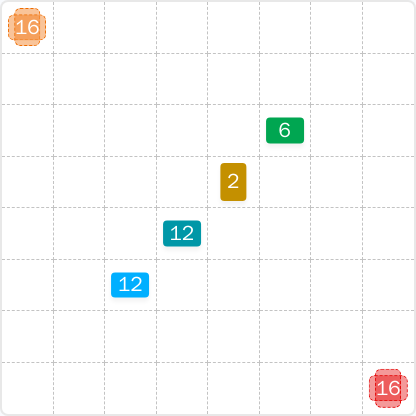
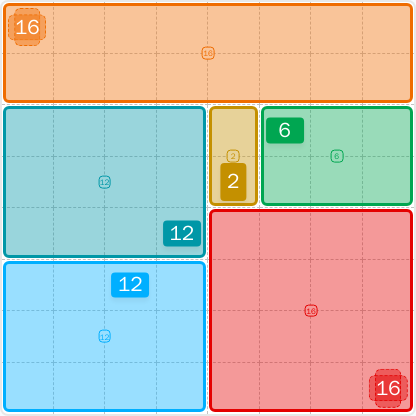
The two 16s are the strongest anchors in today's LinkedIn Patches puzzle. One naturally hugs the top edge, while the other is forced into the lower-right area, which helps split the board into smaller regions.
A large patch on the left needs a clean rectangular space with no bends. Once the top band is fixed, the left-middle region becomes a very constrained 12-cell shape.
The 2 is not just a tiny patch — it also separates the upper-middle area from the upper-right area. That narrow strip is one of the key reasons the solution becomes stable.
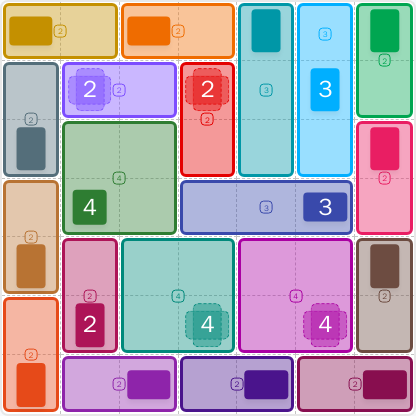
After the edge pieces are placed, the rest of the grid resolves into a pair of 12-cell rectangles plus a 6-cell block. If you keep every patch connected and avoid leaving isolated cells, the full grid solution falls into place.
Still Stuck? Click on Reveal Patches #101 Answer below.
LinkedIn Patches #101 Answer
Original Puzzle
Final Answer
How to Solve LinkedIn Patches #101
Previous Patches Answers
Play Unlimited Patches Games
Enjoy unlimited Patches and other puzzle games anytime. No daily limits, just endless fun!
Play Now - Unlimited GamesMore LinkedIn Games Answers for Jun 26, 2026


Patches #101 FAQ
The answer for LinkedIn Patches #101 is the completed grid shown on the solution page. It follows the published layout for LinkedIn Patches 2026-06-26.
LinkedIn Patches #101 is dated 2026-06-26. This page is built for that specific daily puzzle and its final answer.
You can find the full grid solution on this page. It is presented as a solved layout so you can compare your work against the official answer.
Use edge and corner clues first, then place the largest patches before the smaller ones. That approach is the simplest Patches puzzle guide for #101.
The solution is valid because every patch is connected, matches its number, and fills the board without overlaps. Those are the standard rules for Patches solutions.
LinkedIn Patches #101 is an easy puzzle because the shapes are strongly constrained by the edges. The grid solution comes together with straightforward rectangle logic.