
LinkedIn Patches #96 Answer & Analysis
Stuck on LinkedIn Patches #96? Get spoiler-friendly Patches hints, the final grid solution, and a clear step-by-step explanation for today’s LinkedIn Patches puzzle.
This page includes the final answer and full analysis for LinkedIn Patches #96. Use the hints first if you want to solve the puzzle before revealing the answer.
LinkedIn Patches #96 Hints
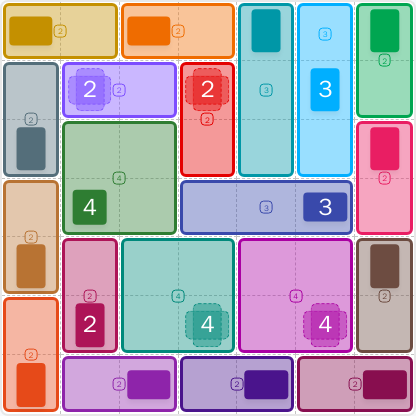
For LinkedIn Patches #96 on 2026-06-21 15:00:16, begin with the most constrained edge and corner patches. The small regions near the top-left and top-center settle quickly once you test how much space they can really use.
The larger number on the upper-right has a very limited rectangle to fit into. If you place that patch correctly, it helps define the whole top band of today's LinkedIn Patches puzzle.
A central patch acts like a divider and splits the board into left and right solving zones. That separation is one of the biggest clues in this Patches puzzle guide.
Below the upper hints, the left side wants a compact vertical or rectangular run. Avoid leaving isolated cells there, because the lower-left region has to stay connected for the final Patches solutions.
The remaining large patch on the far right and the bottom strip are forced by the space that is left. If a placement creates a gap, it is probably wrong. This is usually the key to the final LinkedIn Patches answer.
Still Stuck? Click on Reveal Patches #96 Answer below.
LinkedIn Patches #96 Answer
Original Puzzle
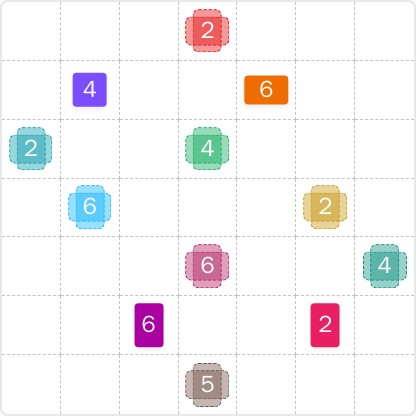
Final Answer
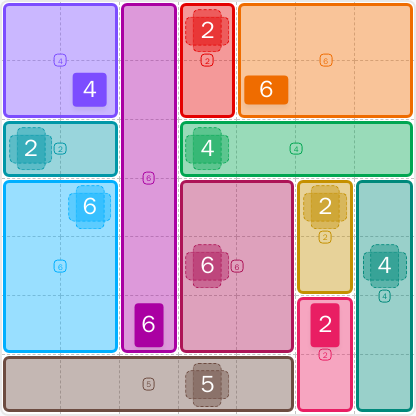
How to Solve LinkedIn Patches #96
Previous Patches Answers
Play Unlimited Patches Games
Enjoy unlimited Patches and other puzzle games anytime. No daily limits, just endless fun!
Play Now - Unlimited GamesMore LinkedIn Games Answers for Jun 21, 2026



Patches #96 FAQ
The LinkedIn Patches answer for #96 is the completed grid shown on this page, with each numbered patch filled to its exact size. This daily page also explains the logic behind today's Patches solution.
Start with the most restricted corners and edges, then place the larger patches that have only one realistic fit. The step-by-step guide above shows the clean solving order for LinkedIn Patches #96.
The best Patches hints focus on the top-left corner, the top-center 2, the upper-right 6, and the central divider. Those areas force most of the board before you reach the bottom band.
Each number tells you how many cells that patch must cover. For example, a 6 patch must use six connected cells, and a 2 patch must use two connected cells.
R2C7 means row 2, column 7. Rows go top to bottom and columns go left to right, which makes it easier to discuss grid solutions and exact patch locations.
Solve the smallest or most constrained regions first, especially corners and edge strips. That reduces guesswork and makes today's LinkedIn Patches puzzle much faster to finish.
The LinkedIn Patches FAQ is here on the answer page, along with the solved layout and a concise Patches puzzle guide for this daily puzzle.