
LinkedIn Patches #98 Answer & Analysis
Stuck on LinkedIn Patches #98? Get spoiler-friendly Patches hints, the final grid solution, and a clear step-by-step explanation for today’s LinkedIn Patches puzzle.
This page includes the final answer and full analysis for LinkedIn Patches #98. Use the hints first if you want to solve the puzzle before revealing the answer.
LinkedIn Patches #98 Hints
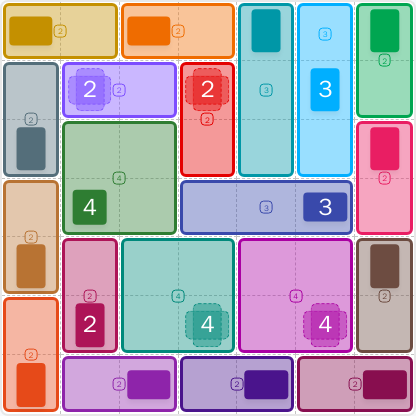
For LinkedIn Patches #98, the easiest place to begin is along the outer border. Edge-anchored patches usually have fewer growth options, so the top row and the far-right side give the cleanest starting points in today's LinkedIn Patches puzzle.
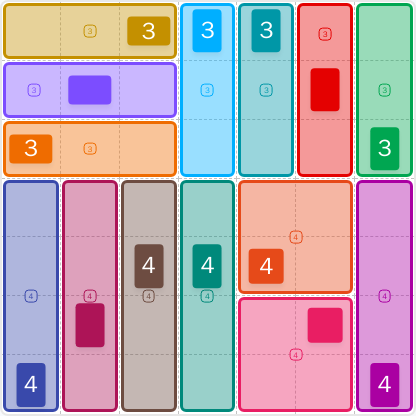
The 3s near the top are tightly boxed in by the grid boundary. In a good Patches puzzle guide, those early 3-cell regions are often forced into straight horizontal or vertical strips before anything in the center can be resolved.
Several numbered patches in this layout only fit as tall, narrow regions. Once the top band is settled, the columns beneath it become easy to read because the larger 4-cell patches need uninterrupted space.
There is a compact area near the middle-right that cannot expand very far in any direction. That kind of pocket usually forces a 2x2 block in today's Patches solution, which helps separate the left side from the right edge.
The final 4-cell patch fits neatly against the lower edge once the nearby columns are committed. If you are checking your LinkedIn Patches answer, make sure no single cell is left isolated near the bottom or right border.
Still Stuck? Click on Reveal Patches #98 Answer below.
LinkedIn Patches #98 Answer
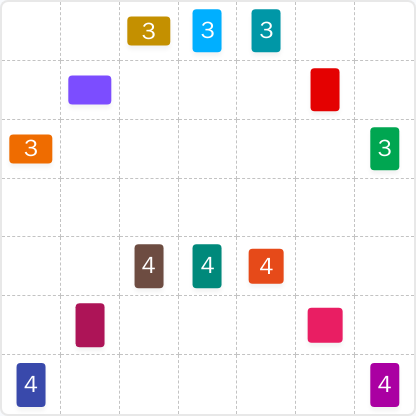
Original Puzzle
Final Answer
How to Solve LinkedIn Patches #98
Previous Patches Answers
Play Unlimited Patches Games
Enjoy unlimited Patches and other puzzle games anytime. No daily limits, just endless fun!
Play Now - Unlimited GamesMore LinkedIn Games Answers for Jun 23, 2026



Patches #98 FAQ
The LinkedIn Patches answer for #98 on 2026-06-23 15:00:18 is shown in the solved layout on this page.
Start with the edge-locked 3-cell patches, then fill the tall 4-cell regions, and finish with the compact 2x2 blocks. That is the fastest way to read today's LinkedIn Patches puzzle.
The best Patches hints are to solve the border pieces first, watch for narrow columns, and use the center-right bottleneck to guide the final placements.
The number on each patch tells you how many cells that connected region must contain. In this puzzle, the 3s make 3-cell regions and the 4s make 4-cell regions.
R2C7 means row 2, column 7, counting rows from top to bottom and columns from left to right. Coordinates are useful for comparing grid solutions and checking a specific cell.
Use the borders first, then fill the most restricted regions before the open center. This method is the core of a reliable Patches puzzle guide and helps you confirm today's Patches solution quickly.
This LinkedIn Patches FAQ page is built for quick search answers, daily puzzle checking, and fast comparisons with grid solutions.