
LinkedIn Patches #103 Answer & Analysis
Stuck on LinkedIn Patches #103? Get spoiler-friendly Patches hints, the final grid solution, and a clear step-by-step explanation for today’s LinkedIn Patches puzzle.
This page includes the final answer and full analysis for LinkedIn Patches #103. Use the hints first if you want to solve the puzzle before revealing the answer.
LinkedIn Patches #103 Hints
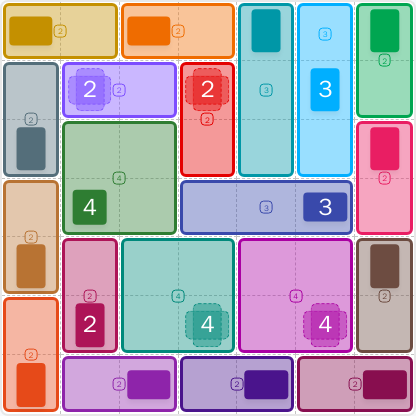
For LinkedIn Patches #103 on 2026-06-28, begin with the outer edges before touching the center. The border patches are the easiest way to reduce the board and avoid accidental isolated cells.
Look for the 6-cell regions that can only fit in long, narrow spaces. When a patch has very few possible paths, it should be placed early in today's LinkedIn Patches puzzle.
The top band has one long horizontal patch, with tall side regions controlling the corners. That row sets up most of the remaining space below it.
The middle of the grid is split by a compact 2-by-3 style region. Once that central patch is fixed, the lower half becomes much easier to read.
Near the end, the remaining cells fall into a full-width horizontal strip and then two smaller blocks beneath it. That final structure is a strong clue in the Patches hints for this puzzle.
Still Stuck? Click on Reveal Patches #103 Answer below.
LinkedIn Patches #103 Answer
Original Puzzle
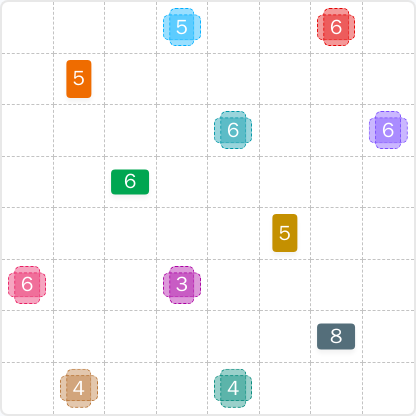
Final Answer
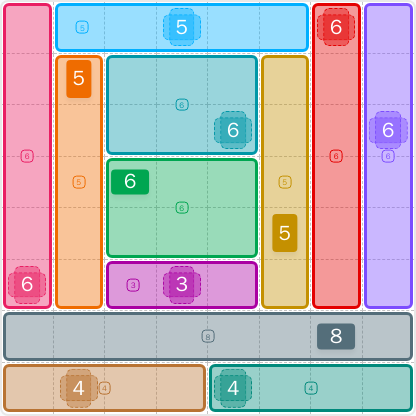
How to Solve LinkedIn Patches #103
Previous Patches Answers
Play Unlimited Patches Games
Enjoy unlimited Patches and other puzzle games anytime. No daily limits, just endless fun!
Play Now - Unlimited GamesMore LinkedIn Games Answers for Jun 28, 2026


Patches #103 FAQ
The LinkedIn Patches #103 answer is the completed grid shown on the 2026-06-28 puzzle page. It includes the full solution and a clear layout of every patch.
This puzzle is best described as medium. The border strips and center blocks create a logical solve, but the layout still needs careful placement.
Use a border-first strategy, then place the long strips and the central divider before filling the remaining spaces. That is the safest way to solve LinkedIn Patches #103.
The final grid solution works because every patch meets its exact cell count, all regions remain connected, and the entire board is covered with no overlaps.
LinkedIn Patches 2026-06-28 is the date for puzzle #103. It is the matching puzzle page for players looking for the answer, grid solutions, and solving help.
The LinkedIn Patches FAQ on this page covers the basic rules, the answer, and a practical strategy for solving the puzzle faster.