
LinkedIn Patches #104 Answer & Analysis
Stuck on LinkedIn Patches #104? Get spoiler-friendly Patches hints, the final grid solution, and a clear step-by-step explanation for today’s LinkedIn Patches puzzle.
This page includes the final answer and full analysis for LinkedIn Patches #104. Use the hints first if you want to solve the puzzle before revealing the answer.
LinkedIn Patches #104 Hints
For LinkedIn Patches #104 on 2026-06-29, begin with the patches that have the fewest possible expansions. Edge and corner numbers are usually the quickest anchors in today's Patches puzzle.
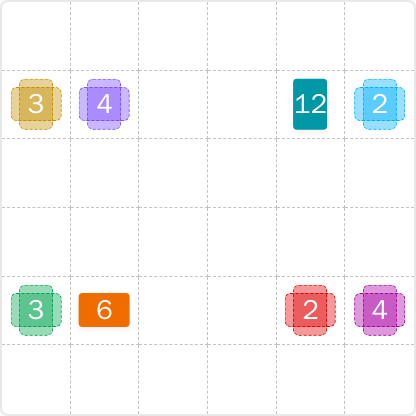
Look closely at the numbers touching the outer border. A patch like 12 has very limited room, so the board edge will strongly restrict its final footprint before anything else is placed.
The 2s and 3s on the right and left sides are easier to settle once you account for the nearby border and the need for each patch to stay connected. This helps prevent stray isolated cells.
One of the biggest clues in this puzzle is the large middle region. In this grid, the central numbered area helps split the board into upper and lower sections, which reduces the options for the remaining patches.
After the border-driven regions are fixed, the remaining open space should fall into a clean connected block. If a patch is still hard to place, it is usually because another nearby region has not been fully locked in yet.
When you think you have the solution, verify that every cell belongs to exactly one connected patch and that the final layout uses all 36 cells. That final consistency check is the fastest way to confirm the LinkedIn Patches answer.
Still Stuck? Click on Reveal Patches #104 Answer below.
LinkedIn Patches #104 Answer
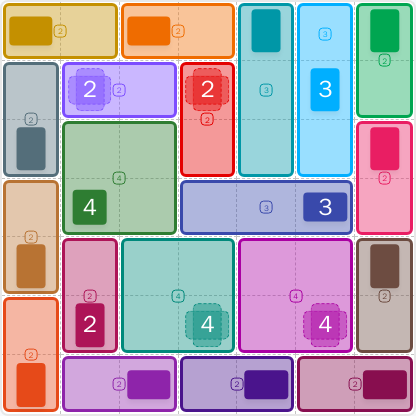
Original Puzzle
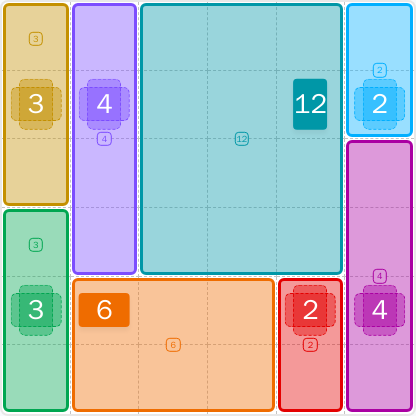
Final Answer
How to Solve LinkedIn Patches #104
Previous Patches Answers
Play Unlimited Patches Games
Enjoy unlimited Patches and other puzzle games anytime. No daily limits, just endless fun!
Play Now - Unlimited GamesMore LinkedIn Games Answers for Jun 29, 2026


Patches #104 FAQ
The LinkedIn Patches #104 answer is the solved grid for 2026-06-29 shown on the static puzzle page. It uses a clean set of connected regions that fully covers the board.
This puzzle is best described as easy. The border constraints and the large central region make the solution path very direct.
Use the Patches puzzle guide approach: place the most restricted patches first, then use the central block to divide the board. After that, the remaining regions fall into place naturally.
It works because every patch has the correct size, each one is connected, and no cells are shared between patches. The final arrangement also fills the entire grid.
It refers to the daily LinkedIn Patches puzzle published on 2026-06-29, puzzle number 104. This page provides the matching Patches solutions and the final grid.
Yes. The static page is designed for that purpose, so you can compare your board against the official grid solution and confirm each patch placement.